Online C Compiler
Write, compile and run C code online for free. Use the browser-based editor to add standard input, view program output and fix compiler errors - no installation or account required.
Online C Compiler Features
Write and test C programs in one browser tab. The editor includes the core tools needed for learning, assignments and quick code checks.
No Installation Required
Run C code in your browser without installing GCC, an IDE or build tools.
GCC Compiler Support
Compile C with the available GCC environment and use the separate GCC 4.8 compiler when a version-specific test is needed.
Standard Input Support
Add input for programs that use scanf, fgets or other stdin functions before you run the code
Works on Desktop and Mobile
Open the compiler on a desktop, tablet or phone with a modern browser and internet connection.
Free to Use, No Signup
Start coding without creating an account or entering payment details.
Instant Output and Compiler Errors
Review stdout, stderr, warnings and compilation errors in the output panel, then edit and run again.
How to Compile and Run C Code Online
Use the editor to test a C program in 3 simple steps.
Write or Paste C Code
Enter your program in the editor or open a local source file.
Select Run Code
The selected compiler builds and executes the program in the hosted environment.
Review the Result
Read the output or compiler error, update the code and run it again.
Who Is This Compiler For?
Whether you are writing your first printf or optimising a production system, Online Compiler C is built for you.
Beginners
Starting with C can feel daunting — compilers, terminals, flags. Online Compiler C removes all of that. Open your browser, write code, press Run. No installation, no configuration, no error-prone setup standing between you and your first working program.
- Start coding in under 30 seconds
- Instant error messages to learn from
- Built-in example programs to study
- No account or sign-up required
Students
Coursework, assignments, lab sessions — you need a reliable C environment that works on any machine, including library computers and tablets. Online Compiler C is consistent, always available, and requires nothing from IT to set up.
- Works on any device with a browser
- No software permissions needed
- Test and submit assignments faster
- Practise for exams anytime, anywhere
Professionals
When you need to quickly validate logic, demonstrate a snippet in a meeting, or test a standard library function without spinning up a local environment, Online Compiler C gets out of your way. Multiple GCC versions let you reproduce environment-specific behaviour instantly.
- Quick prototyping without context switching
- Multiple compiler versions (GCC, C++17, GCC 9.2)
- Share or demo code in any browser
- Interview preparation and code walkthroughs
Learn by running real C code
Click any Run Example button to instantly load the code into the editor above, then hit Run to see the output.
The classic first program. Print a greeting to the screen using printf.
Calculate the factorial of a number using a recursive function.
Check whether a given number is prime or not using trial division.
Generate the Fibonacci sequence up to N terms using a loop.
Determine if a string reads the same forwards and backwards.
Create a singly linked list, insert nodes, and print the list.
C Programming Projects for Beginners
Practice what you learn by building real programs. Click Run Starter Code on any project to load it into the compiler above — output appears instantly, no input needed.
Simple Calculator
Build a program that accepts two numbers and an operator (+, −, ×, ÷) and prints the result. Covers user input, arithmetic operators, and conditional logic.
Number Guessing Game
Generate a random number and prompt the user to guess it. Give "higher" or "lower" hints until they find it. Introduces rand(), loops, and conditional feedback.
Temperature Converter
Convert between Celsius, Fahrenheit, and Kelvin using dedicated functions. A clean, focused project for practising function declarations, return values, and basic formulae.
Student Grade System
Store student names and marks in a struct array. Calculate averages, find the highest/lowest scorer, and assign letter grades. A great introduction to structs and arrays working together.
Sorting Algorithms
Implement Bubble Sort and Selection Sort on an integer array. Compare their outputs and understand sorting mechanics through hands-on experimentation.
Bank Account System
Simulate a simple bank with deposit, withdrawal, and balance check operations. Models a real-world entity using structs and teaches function design, validation, and state management.
Matrix Operations
Read two matrices and perform addition and multiplication. Solidifies understanding of 2D arrays, nested loops, and how linear algebra maps to code.
Dynamic Stack
Build a stack data structure using dynamic memory allocation. Implement push, pop, peek, and isEmpty — tying together pointers, malloc/free, and modular function design.
All starter programs above run in the Online C Compiler above — no installation needed.
Online Compiler C is a free C compiler and Integrated Development Environment (IDE) that anyone may use to learn and practise C programming. Users may develop and run C programming directly in the browser without having to install any software on their computers.
Online Compiler C's user-friendly design and strong capabilities make it simple for beginners to get started with C programming and for expert users to test and debug their code.
Online Compiler C
Online Compiler C is a powerful online tool for developers that allows users to write, build, and run C Programming code online. You may simply build, modify, and test C programmes using this platform, which requires no other software or installation.
The platform provides a user-friendly interface, making it easy to write, debug, and test your code. You can also customise the editor theme to match your preferences.
Online Compiler C supports a variety of C compilers, including our online GCC compiler, Clang, an online C++ compiler and C#, making it simple to build and run your applications across platforms.
Online Compiler C is an excellent tool for learning, testing, and debugging your code, whether you are a beginner or an experienced C developer.
So, why delay? Try it out today and discover the convenience and flexibility of online C programming!
Overall, Online Compiler C is a powerful and easy-to-use tool for developers who want to write, compile, and run C programs online without any installation or configuration hassle.
In case you encounter any issues with our compiler, kindly get in touch with us using our contact page.
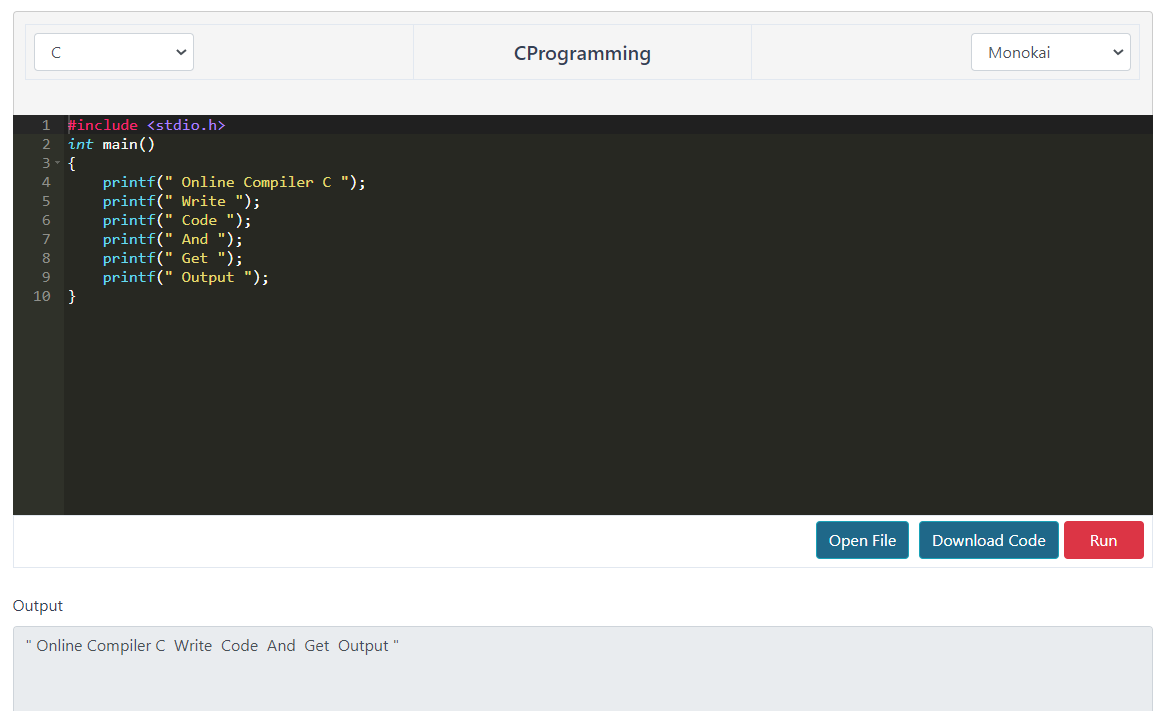
Compiler Output
About C Programming
C is a general-purpose, high-level programming language that was originally developed by Dennis Ritchie at Bell Labs in the 1970s. It is a structured programming language that supports a wide range of programming constructs, including functions, loops, conditional statements, and pointers.
C's ability to directly handle memory is one of its distinguishing properties, making it a great language for system programming and embedded system development.
C is also highly portable, which means that programmes written in C may run on a number of systems with minimal modification.
C has had a significant influence on the development of many other programming languages, including C++, Java, and Python. It remains one of the most widely used programming languages today, with applications ranging from operating systems and device drivers to scientific computing and video games.
Why Should I Learn C?
There are various advantages to learning C, including:
- Widely used language: C is a widely used computer language that serves as the foundation for many other programming languages. It is used in the development of operating systems, embedded systems, device drivers, and other applications.
- Low-level programming: C allows you to write low-level code that interacts directly with hardware, which makes it perfect for designing embedded systems and device drivers.
- Speed and efficiency: C code is generally fast and efficient, making it ideal for applications where speed is critical.
- Memory management: C supports manual memory management, giving you greater control over how memory is allocated and deallocated.
- Portability: C code is portable because it can be compiled to run on several systems and architectures.
- Career opportunities: C is a valuable skill to have in the jobs market, with many companies looking for C-experienced developers.
Syntax Help for C Programming
1. If Else
If-else is a conditional statement in C programming that allows a programme to execute certain statements based on the outcome of a Boolean expression. The following is the basic syntax for an if-else statement:
if (condition) {
    // block of code to be executed if the condition is true
}
else {
    // block of code to be executed if the condition is false
}
Here, condition is the Boolean expression that is evaluated. If the condition is true, the block of code inside the if statement is executed. Otherwise, the block of code inside the else statement is executed.
For example, the following code snippet uses the if-else statement to determine if a given integer is even or odd:
#include <stdio.h>

int main() {
    int num;

    printf("Enter a number: ");
    scanf("%d", &num);

    if (num % 2 == 0) {
        printf("%d is even.\n", num);
    }
    else {
        printf("%d is odd.\n", num);
    }

    return 0;
}
2. Switch Case
The syntax for a switch-case statement in C programming language is as follows:
switch(expression) {
    case constant-expression1:
        // code to be executed if expression matches constant-expression1
        break;
    case constant-expression2:
        // code to be executed if expression matches constant-expression2
        break;
    // more cases can be added
    default:
        // code to be executed if none of the cases match expression
}
3. Loops
These are several loop examples in C programming:
For loop:
for (initialization; condition; increment/decrement) {
    // code to be executed
}
While loop:
while (condition) {
    // code to be executed
}
Do-while loop:
do {
    // code to be executed
} while (condition);
The condition is verified at the beginning of all three loops. The loop body is performed if it is true. Following the execution of the loop body, the increment/decrement statement (for the for loop) is run, and the condition is verified again. This operation is repeated until the condition is no longer satisfied.
Why Use Online Compiler C?
Online Compiler C removes every barrier between you and running your first — or thousandth — line of C code. Traditional C development requires installing a compiler, configuring a build system, and troubleshooting environment issues before you write a single line. With Online Compiler C, none of that is necessary. You open a browser tab, write your code, and click Run. The entire compilation and execution pipeline is handled in the cloud, and the result is returned to you within seconds.
This matters most when you need to quickly validate an idea, test a function, or demonstrate code to someone else. Whether you are in a classroom, a coffee shop, or working on a machine without a local development environment, Online Compiler C gives you a fully functional C compiler wherever you are.
Benefits of Browser-Based Programming
Browser-based compilers democratise programming by making it accessible without hardware or software prerequisites. Students on shared computers, developers using a colleague's machine, or professionals doing a quick check from a tablet all benefit from zero-install tools. There is no version mismatch, no PATH configuration, and no missing library — the environment is consistent every time.
Consistent Cross-Platform Results
Because compilation happens on a standardised server environment, results are consistent regardless of whether you are on Windows, macOS, or Linux. This is particularly valuable when learning, since beginners often encounter platform-specific differences that can obscure the real lesson. Online Compiler C gives everyone the same experience.
Advantages of Learning C Programming
C is often the first programming language recommended for students serious about understanding how software actually works. Unlike higher-level languages that abstract away memory management, C exposes you to pointers, stack and heap allocation, and direct hardware access. This low-level understanding makes you a better programmer in any language you learn next.
C remains one of the most widely used languages in the world. The Linux kernel, the Python interpreter, the SQLite database engine, and countless embedded systems are written in C. Learning C opens doors to systems programming, embedded development, operating system design, game engines, and performance-critical applications where milliseconds matter.
- Foundation for other languages: C++ extends C, and languages like Java, Python, and Rust drew heavily from C's syntax and concepts.
- Deep understanding of memory: Manual memory management teaches you how software interacts with hardware at a fundamental level.
- Career value: C expertise is in demand in embedded systems, automotive software, firmware, and operating systems development.
- Portability: C compiles to efficient machine code on virtually every processor architecture in existence.
- Speed: C programs are among the fastest executable programs because they run directly without a virtual machine or interpreter overhead.
Common Applications of C Programming
C is not a language of the past — it is the language of infrastructure. Here are some domains where C is still the dominant choice:
- Operating systems: The Linux kernel, Unix, and core components of Windows and macOS are written in C.
- Embedded systems: Microcontrollers in cars, medical devices, industrial machinery, and consumer electronics rely on C for its predictable performance and low overhead.
- Compilers and interpreters: GCC itself, CPython, and many programming language runtimes are written in C.
- Networking: Core network protocols and routing software often use C for performance-critical code paths.
- Game development: Game engines and real-time physics engines use C and C++ for speed-critical rendering and simulation code.
- Scientific computing: High-performance numerical libraries such as LAPACK and BLAS are written in C and Fortran for raw computational speed.
Benefits of GCC — The GNU Compiler Collection
GCC is the compiler behind Online Compiler C, and its choice is deliberate. GCC is a battle-tested, production-grade compiler that has been developed and refined since 1987. It supports C, C++, Fortran, Ada, Go, and more. Using GCC means your code is compiled with the same tool used to build the Linux kernel, Android, and thousands of open-source projects.
GCC performs aggressive optimisations at multiple levels, produces highly efficient machine code, and provides detailed error and warning messages that help you write better code. Learning with GCC also means your skills transfer directly to professional and open-source development environments.
Online Compiler Benefits for Students
Students benefit enormously from having a reliable compiler available without setup friction. Assignments can be tested immediately, tutorials can be followed in real time, and exam preparation can happen from any device. Online Compiler C includes C programming tutorials and example programs specifically designed to support learning, making it more than just an IDE — it is a learning environment.
Online Compiler Benefits for Developers
Experienced developers use online compilers for rapid prototyping, quick API checks, and demonstrating code in meetings or code reviews without switching contexts. Online Compiler C supports multiple language variants — standard C, GCC 4.8, C++ 17, and C++ GCC 9.2 — giving professionals the flexibility to test across compiler versions instantly.
C vs C++ — What Is the Difference?
C and C++ are closely related but solve different problems. Understanding when to use each is a fundamental skill for any systems programmer.
| Feature | C | C++ |
|---|---|---|
| Paradigm | Procedural | Multi-paradigm (procedural + OOP) |
| Classes & Objects | No | Yes |
| Inheritance | No | Yes |
| Templates / Generics | No | Yes |
| Standard Library | stdio.h, stdlib.h, string.h | STL (vectors, maps, algorithms) |
| Memory Management | malloc / free | new / delete + RAII |
| Exception Handling | No | Yes (try / catch) |
| Typical use cases | OS kernels, embedded, firmware | Game engines, GUI apps, systems software |
| Compilation speed | Fast | Slower (larger standard library) |
| Learning curve | Steeper (manual everything) | Broader (more concepts) |
When to choose C
C is the right choice when you need maximum control over hardware, minimal runtime overhead, or guaranteed portability to constrained environments. The Linux kernel, the GCC compiler itself, and the Python interpreter are all written in C because nothing else provides the same combination of speed, predictability, and portability.
If you are working on embedded systems, device drivers, real-time operating systems, or performance-critical libraries, C is the standard choice — and the one most employers in those fields expect.
Try C Compiler →When to choose C++
C++ extends C with object-oriented programming, templates, and the Standard Template Library. It is the dominant language for game development (Unreal Engine), high-frequency trading systems, browser engines (Chrome, Firefox), and desktop application frameworks like Qt.
If your project benefits from abstraction — classes, inheritance, generic algorithms — but still needs the raw performance of compiled code without a garbage collector, C++ is the answer.
Try C++ Compiler →Both C and C++ are available on Online Compiler C. You can switch between them instantly using the language selector at the top of the compiler — no separate tool or installation needed.
C Programming Learning Resources
The best way to learn C is to write C. Use the compiler above to follow along with any of these authoritative references and tutorials.
cppreference.com
The definitive C and C++ language reference. Covers every standard library function, type, and language construct with examples. Bookmark this — you will use it constantly.
ReferenceGeeksforGeeks — C Tutorial
Thousands of C articles, solved problems, and interview questions. Particularly strong on data structures, algorithms, and common programming patterns in C.
TutorialProgramiz — C Programming
A structured, beginner-friendly C course covering fundamentals through advanced topics. Well-paced with clear examples that you can paste directly into this compiler to test.
CourseGNU GCC Documentation
Official documentation for GCC — the compiler powering Online Compiler C. Covers compiler flags, extensions, optimisation levels, and language standard support (C89, C99, C11, C17).
Official DocsC Language — Wikipedia
A comprehensive overview of C's history, design philosophy, standards timeline (C89 through C23), and influence on modern programming languages. Essential context for understanding why C is designed the way it is.
ReferenceLearn-C.org
Free interactive C tutorials that run in the browser. Each lesson covers a single concept with a hands-on exercise. Perfect for absolute beginners who learn best by doing rather than reading.
InteractiveFrequently asked questions
Everything you need to know about Online Compiler C. Can't find your answer? Contact us.
An online C compiler is a browser-based tool that lets you write, compile and run C code without installing a compiler or IDE on your device.
Yes. You can use the compiler without payment or an account. Open the editor, write your code and select Run Code.
The current selector lists C, C with GCC 4.8, C++ 17.0, C++ with GCC 9.2 and C# 11.0.
Yes. Online Compiler C supports GNU Compiler Collection (GCC) for both C and C++. GCC is the industry-standard compiler used in professional software development, embedded systems, and operating system development.
Yes. The interface is responsive and should keep the editor, Run Code button, input and output usable on smaller screens.
No. Compilation and execution take place in the hosted environment, so you only need a modern browser and an internet connection.
Absolutely. Online Compiler C is designed to be beginner-friendly. The editor includes syntax highlighting, code autocompletion, and error messages to help new programmers understand and fix their code. The page also includes C programming tutorials and example programs to help you learn.
No registration or account is required. You can start writing and running C code immediately. Simply visit the website and use the compiler — no sign-up, no login, no personal information needed.
Yes. Online Compiler C is ideal for testing short code snippets, checking syntax, verifying logic, or experimenting with C programming concepts. The fast cloud execution means you get results in seconds even for small programs.
When you select Run Code, the source code and optional input are sent to the hosted execution service. The selected compiler builds and runs the program, then returns output, warnings or errors to the page. Developer note: generate the compiler-version answer from the same configuration as the language selector so it stays accurate when versions change.